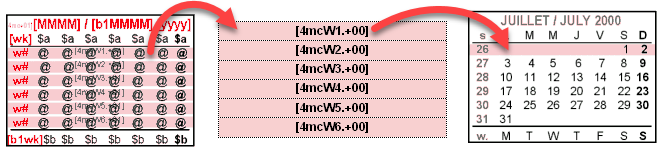
Minicalendar Weekly Bands Tokens are a variation of minicalendar tokens used to highlight the current week of a minicalendar.
➢The textbox which contains the Weekly Band token is either deleted or it is kept, with the token being replaced by a blank.
The syntax of these tokens is either:
[mcwx.+zz] [mcwx.zzz] (delete textbox only)
or
[mcWx.+zz] [mcWx.zzz] (delete textbox and grouped objects)
In the 2 above cases:
•The value of x ranges from 1 to 6 and corresponds to the 6 possible partial weeks contained in a month.
•The +zz or zzz correspond to the relative or absolute method of calculating the current month.
Further options beyond deletion
If the date corresponding to the DayValue of this token is within the week represented by the token, then the textbox is kept (and possibly modified depending on the current week band minicalendar options of your script), otherwise it is deleted, except in the cases below.
Different weekdays used as start of week
In the case when your weekstart minicalendar option is set to Monday, then the behavior of this token is as expected. Otherwise, the other weekstart values behave as follows:
•If the weekstart minicalendar option is set to Sunday, then the date used to determine if the current weekly band corresponds to the current week, is the date of the token plus one.
•If the weekstart minicalendar option is set to Saturday, then the date used to determine if the current weekly band corresponds to the current week, is the date of the token plus two.
Otherwise, if the weekstart minicalendar option is set to Tuesday to Friday, then the current weekly band token will always result in its textbox, and any item grouped to it, to be deleted.
Non-current minicalendars
Relative Weekly Bands tokens can also be placed in non-current minicalendars.
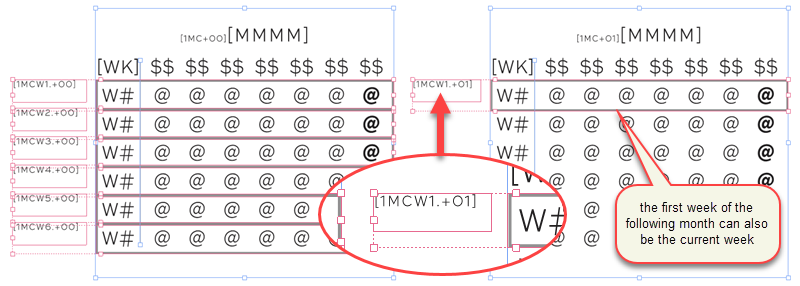
For obvious reasons, the only ones which will ever be displayed are:
•The last rows of the previous month, namely [mcW5.-01], [mcW6.-01] and [mcW4.-01] (for the rare case of February minicalendars when February starts on a Monday and we are not in a leap year).
•The first row of the next month, namely [mcW1.+01].
Non-rectangular shapes and images
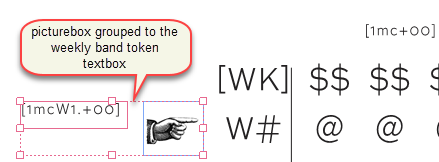
In the example on the right, textboxes with Weekly Bands tokens are grouped to a picturebox.
In such cases, make sure to use an uppercase W in the Weekly Bands tokens to indicate that its textbox and any other object grouped to it, should be deleted.
Additional conditions
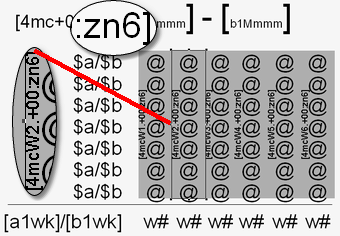
In the example on the right, the position and size of the weekly bands depend on the number of weeks in the current month.
Therefore, there are 4 minicalendars for each possible month, one for each of the possible cases; a 4, 5 or 6 week month. The example above shows the minicalendar for the 6-week case, which further uses the :Zn6 number of weeks modifier.
Topic 000152, last updated on 09-Mar-2026