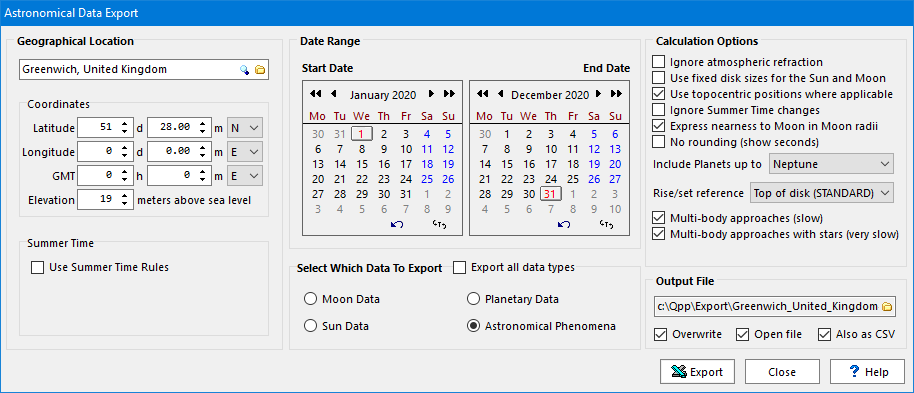
The Astronomical Data Export dialog is accessible from the Data > Export to Excel > Astronomical Data menu sequence, and can be used to export a wealth of astronomical data for any location on the Earth (via the Geographical Location options) and any year (via the Date Range options section).
The available data that can be exported (selected via the Select Which Data To Export section) are:
Displays the following daily information: Moonrise, Moonset, Moon Transit time and angle, Right Ascension, Declination, astronomical constellation, longitude, astrological constellation, phase angle, phases of the Moon, distance from Earth, perigee and apogee. |
|
Displays the following daily information: Sunrise, Sunset, Sun Transit time and angle, dawn, dusk, length of day, length of daylight, solar longitude, solstices, equinoxes, seasons, distance from the earth to the Sun, perihelion, aphelion. |
|
For any of the planets, including Pluto, displays the planet's rising (time and azimuth), setting (time and azimuth), transit time and transit angle. In addition, these values are grayed-out if the planet is hidden by the Sun (in-between heliacal setting and rising) or always below the horizon (for northernmost latitudes above 66 degrees) or if that event occurs during daytime.
Also included is the morning and evening planetary visibility according to our own planetary visibility criteria, as well as for our approximation to the criteria used in the USNO Astronomical Phenomena and Astronomische Grundlagen publications and our own visibility criteria, as we find both aforementioned criteria a bit lacking. |
|
For all the planets as well as the brightest stars, this option will display conjunctions, quadratures, opposition, heliacal rise, heliacal setting, eclipses, occultations, near passes, astronomical entrance, astrological ingress, Moon nodes, maximal elongations, maximal declination, retrograde movement. |
The export combines event catalogues with local observing information. A geocentric event is defined as seen from the centre of the Earth; a topocentric position is calculated for the selected observer. Displaying an event in local time, or adding a visibility annotation, does not by itself make the underlying event a topocentric calculation.
For lunar occultations, the event time is the global maximum. The location-based observing checks describe conditions at that instant; they do not determine local occultation contacts or establish that the Moon covers the object from the selected location. The “not visible from this location” annotation refers to those observing checks.
For closest-approach entries between two bodies other than the Moon, the event time and the displayed angular separation use the same geocentric calculation, with separation evaluated at that event time. Optimal-visibility entries for pairs or triples instead use topocentric positions at the selected observing time, which need not coincide with a geocentric closest approach.
As you select one of the options of the Select which Data to export groupbox, you will see the corresponding appropriate calculation options appear at the right in the Calculation Options groupbox.
See also: planetary visibility, astronomical tokens, astronomy appendices, astrological macro functions and astronomical macro functions, moon data, and sun data.
Topic 179125, last updated on 15-Sep-2026
