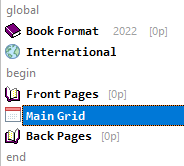
bare-bones script
A script is made up of some mandatory script lines, and some additional, optional, script lines.
When you create a new script, all the required script lines of a script are automatically created and displayed in the script editor.
The Sections of a Script
There are 2 sections to a Script:
| Global | The 2 script lines in this section set the options for the diary as a book, Book Format, and for the International options (holidays, languages). |
| Begin-End | The heart of the script lies between the Begin and End markers. In analogy to a physical diary, there are some Front Pages (info pages, possibly a yearly grid, …), a Main Grid, and some Back Pages. As we will see in The various Q++Studio script lines, this is the section where many new types of pages can be added. |
The script lines within the Begin-End markers correspond to the organization of most real-life diaries: some info pages at the front, a dated section, and finally some info pages at the back.
None of the above lines can be deleted. A more complex Script (see sample below) will have script lines that are children of the front and back pages, as well as inserts applied to the Main Grid.
The indentation of the script lines makes the parent-child relationship between lines clear.
•It is possible, and very frequent, to have DiaryGridLines in the front and back pages (the Main Grid may be a weekly grid, and there may be a yearly grid at the front and back).
•A DiaryGridLine can be a child of another DiaryGridline, indirectly, through an Insert script line.
•These DiaryGridLines can be used in the same manner as the Main Grid (ie. they can have Inserts).
To see how to add, modify and delete script lines, click here.
Copying/Moving a ScriptLine Below/After Another ScriptLine
Different types of script lines can be inserted after (at the same indent level) or under (as children of) other types of script lines.Here are the allowed possibilities:
•If the selected script line in the scripts editor is either a Front Pages or Back Pages or an Insert, then the types of script lines that can be inserted under (as a child) are: Blank Pages, Place Holders, PDF Pages, InDesign Pages, Quark Pages and DiaryGridLines.
•If the selected script line in the scripts editor is either a Blank Pages or a Place Holders or a PDF Pages, or an InDesign Pages, or a Quark Pages or a DiaryGridLines, then the types of script lines that can be inserted after are: Blank Pages, Place Holders, PDF Pages, InDesign Pages, Quark Pages and DiaryGridLines.
•Additionally, If the selected script line in the scripts editor is a DiaryGridLines, then the Insert type of script lines can also be inserted under.
The above rules are automatically enforced in the Q++Studio user interface, in the script line toolbar, the drag and drop of the script editor, the copy script line from dialog, and the XML script editor.
Topic 108020, last updated on 08-Sep-2026
