void = RaiseError(sErrorMessage, bAbortScript)
Use the RaiseError macro function to generate your own error messages during the execution of a macro.
This void function takes 2 parameters :
sErrorMessage |
This is the text that will appear in the error message, whether it is simply a run-time message, or it causes the script to abort. |
bAbortScript |
If bAbortScript is false, the current function stops the current macro and adds a run-time message to the diary generation messages window, but diary generation continues.
If bAbortScript is true, the current function aborts the current script and displays a modal message with the context of the error. |
The RaiseError function is useful when you know that the macro execution reaching a certain position is definitely an error (no need to check if a condition is true as in the case of the Assert function).
switch nWeekdayNumber
case 1..5
// do weekday stuff
case 6..7
// do weekend stuff
else
RaiseError('nWeekdayNumber is not in range of 1-7', true)
endswitch
Examples
bAbortScript = false
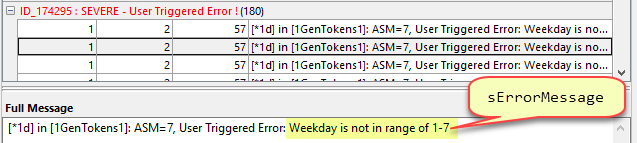
The following call to RaiseError with bAbortScript being false,
RaiseError('nWeekdayNumber is not in range of 1-7', false)
would stop the current macro and add the following messages to the diary generation messages dialog, but diary generation would continue.
bAbortScript = true
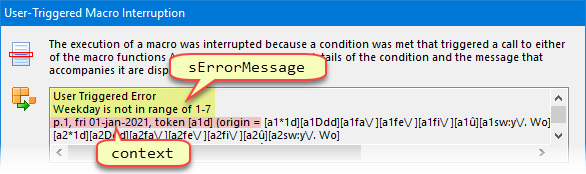
The following call to RaiseError with bAbortScript being true,
RaiseError('nWeekdayNumber is not in range of 1-7', true)
would then immediately display the following dialog, with detailed information about the context of the message, and then abort script execution.
Alternatives
If you only want to verify that a unique basic assumption is true, then an alternative is to use the Assert function, instead, or if you want a run-time message to be generated, without causing any error condition, you may want to use the LogMessage function.
Topic 174290, last updated on 10-Oct-2026
