This DTP processing message occurs when a macro includes a call to one of the textbox resizing functions, on a textbox which is rotated (that is to say, whose angle is not 0°).
QuarkXPress
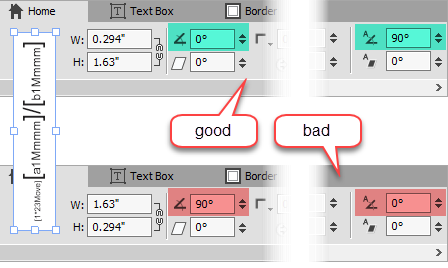
when using QuarkXPress always rotate the text rather than the textbox
When using QuarkXPress, the present warning message only appears if the rotation angle is a multiple of 90 degrees. We strongly recommend that you address this message, by rotating the text rather than its containing box, as shown on the right.
InDesign
When using InDesign, this error message only appears if the rotation angle is not a multiple of 90 degrees, and indicates that the current command will be ignored.
Background
Because of the way that rotation of textboxes are performed internally by QuarkXPress and InDesign, resizing a textbox means rotating the box back to 0 degrees, resizing it, and then rotating it back to its original value.
However this re-rotation is performed by rotating about the center of the box, which has changed position since the box has changed size. This implies a complex coordinates transformation on the part of Q++Studio to ensure that the resulting box appears where and how one intuitively expects it to.
In the example above right, based on the QuarkXPress user interface, both settings produce the same text and textbox, visually, but the top settings are always preferable.
Note that rotating text independently of the text frame that contains it is a bit more complex when using InDesign. See the page rotating text and text frames independently on the InDesignSecrets website for detailed examples.
Topic 185030, last updated on 21-Jan-2025