In InDesign, type-on-path (also called text on path) allows you to display text that follows the path of either a text frame or a line.

examples of type-on-path (including anchored boxes inside)
All normal text actions can be performed on tokens or text located in a type-on-path InDesign object.
In particular, tokens and text in anchored boxes within a type-on-path (as shown in the right-most example above), are also processed normally, allowing for the use of BOXFIT and BOXGROW tokens within type-on-path.
Limitations
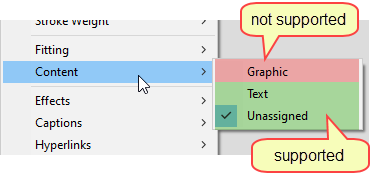
Placing a type-on-path on a graphics frame will generate message 188860.
Any attempt to perform actions that are not text action, such as paragraph or textbox actions, will generate message 188855, except for BOXFIT and BOXGROW (as mentioned above).
Topic 188850, last updated on 25-Feb-2026