Property of the script line: Inserts.
This option, which is closely linked to the property insert first page, is used to specify if the script lines that are to be inserted at every occurrence of an Insert script line should be inserted before or after the page where the insertion dates occur.
➢The exact insertion position also depends on insert first page and whether the grid can be split. If the grid cannot be split, then insertions will occur before the first page of the current complete grid, or after the last page of the current complete grid (which may be a few days before or after the specified insertion date).
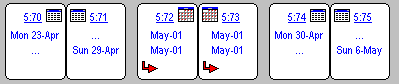
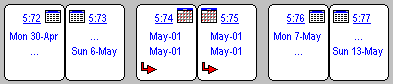
The examples below, taken from the script preview, illustrate this. Using repeating dates, a monthly grid is set to be inserted on the 1st of every month.
Insert before
Insert after
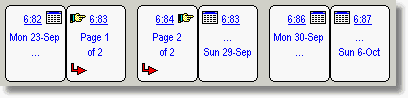
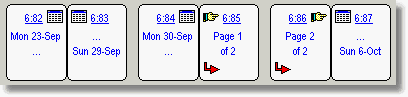
By default, pages will be inserted, starting on a left page. If you prefer the inserted pages to start on the right (to insert a re-order sheet on October 1st, as shown below), then use the setting insert first page.
Insert before (start on right page)
Insert after (start on right page)
See also: February 28, March 1st, ignore sidedness, insert first page, insertion rule, skip insert.
Topic 038000, last updated on 19-Oct-2026
