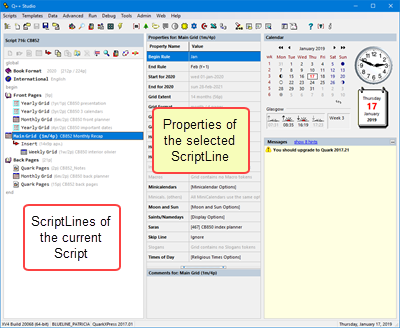
When you select a script line in the script editor, its list of properties is displayed in the Properties Inspector.
From a usage point of view, there are 4 types of properties:
•Properties you will set every time you create a script, because they are fundamental to what makes one script different from another script. Examples are: Grid Template and Output FileName.
•Properties you will often set because, although your company's preferences are in Q++Studio Preferences, there are often variations on the preferences due to the GridTemplate or the customer. Examples are: mini-calendar options, aeiou-Holidays, Begin/End Rules.
•Properties you will seldom set because they are almost always the same and you have set them in the preferences. Examples are: languages and moon data.
•Properties you will never set because they are read-only and are only meant to inform you of the side-effects of other properties. Examples are: # defined pages, language count and start for <year>.
In some cases, some properties are not applicable to the current script line. Examples are the properties mini-calendar options, Macros and Slogans, when the parent DiaryGridLine does not contain any mini-calendar token, Macro tokens or Slogan tokens. In these cases the property will be displayed in a way to draw attention to that fact.
See also: script line properties xml identifiers.
Topic 000172, last updated on 01-Aug-2020