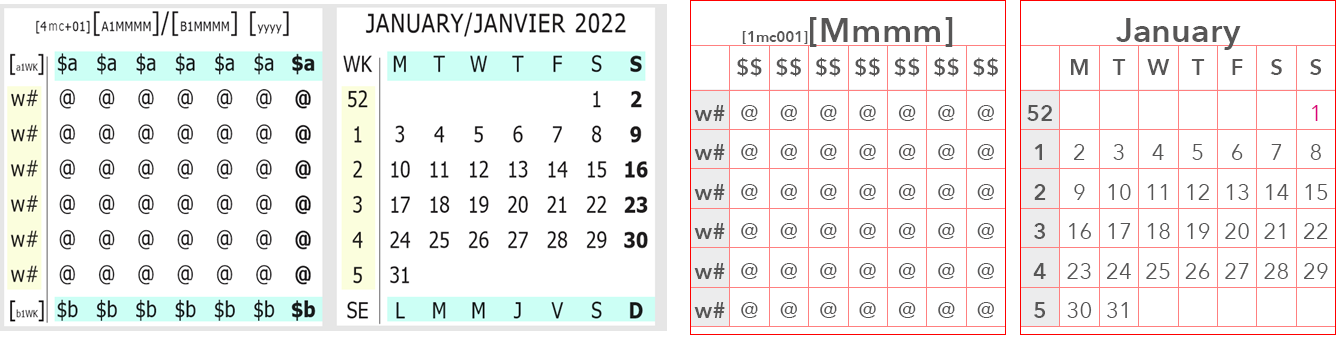
minicalendars placed in a single textbox, left, or in a table, right (InDesign only)
Mini-calendar tokens, and the corresponding mini-calendar script line property, are used to display mini-calendars.
QuarkXPress
When using QuarkXPress, all the tokens related to a mini-calendar must be located in the same textbox, as shown above left.
InDesign
When using InDesign, tokens can also all be placed in the same textbox, as is done in QuarkXPress. But, it is also possible to use an InDesign table to display all the tokens related to a mini-calendar, as shown above right.
Minicalendar Token and Codes
With reference to the example above left, mini-calendar are made up of the following tokens and codes.
[4mc+01] |
This is the mini-calendar marker token.
This token does not display anything; It is used to determine the month and year of the current mini-calendar, interpret the various mini-calendar codes (such as @, $a or w#), as well as the reference date of any ordinary tokens placed inside the mini-calendar.
The base mini-calendar token can be augmented by a large number of mini-calendar token modifiers which can modify almost all aspects of the mini-calendar. |
$a and $b |
These are weekday headers, which are replaced by weekdays. If your script only uses one language, then you can replace $a by $$. |
w# |
These are the week numbers. |
@ |
These represent all the possible mini-calendar dates. |
Ordinary Tokens inside a Minicalendar
By tokens inside a mini-calendar, we mean tokens that are placed in the same textbox as, and after, a minicalendar marker token.
Ordinary tokens placed after the mini-calendar marker token use the first day of the mini-calendar’s month as the date corresponding to DayValue 1.
Use an Embedded Tokens Week Start modifier (:ws) to change this reference date to the beginning of the week containing the first of the month.
Topic 000143, last updated on 06-Oct-2026
