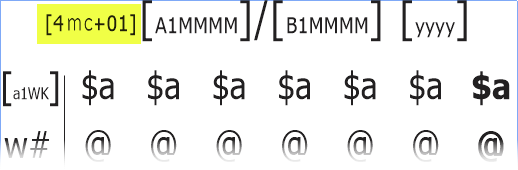
[DayValue mc+XX Modifiers]
or
[DayValue mcXXX Modifiers]
Note that:
•The mini-calendar Marker Token must be placed before any of the mini-calendar-specific codes.
•The spaces placed in the above examples are there to make the structure easier to see, but there should be no spaces in mini-calendar marker tokens.
•There is no LanguageTag because each token or marker that will follow defines its own language tag (allowing for the use of many languages in the same mini-calendar
•DayValue corresponds to the usual DayValue used in all tokens.
•Modifiers is one, or more, or none, mini-calendar token modifiers which, when included in the mini-calendar marker token modifies some aspects of the mini-calendar (for example, the tab character insertion modifier causes every tilde (~) in the mini-calendar to be replaced by a tab character).
•XX and XXX determine the month displayed by the mini-calendar, either as a relative number of months offset or as an absolute month number (more details in the next section).
Any ordinary token placed in a mini-calendar textbox, after the mini-calendar Marker Token, will have the date of DayValue 1 shifted to the 1st day of the month of the mini-calendar (unless one uses one of the mini-calendar token modifiers which changes this behavior).
Minicalendar DayValues Guidelines
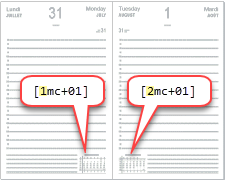
1.The DayValue of any mini-calendar must be one of the DayValues displayed on the current 2-page spread.
2.Whatever DayValue you choose in rules 1, you must then use that DayValue for all the mini-calendars of the current 2-page spread.
Concretely, looking at the example on the right, a 2 days on 2 pages grid containing DayValues 1 and 2, this means:
1.Since the current spread contains DayValues 1 and 2, you must use either 1 or 2 as DayValue for your mini-calendars. You can choose either value, but it must be one of these 2 values, none other.
2.If you chose 1 as DayValue in rule 1, then all the mini-calendars of the 2 pages must use the DayValue 1. So, for example, if the mini-calendars of that grid were to show the current month and the next month, then, having chosen 1 as DayValue for your mini-calendars, you would have [1mc+00] on the left page and [1mc+01] on the right page and not [2mc+01] (wrong).
Choosing a DayValue
In rule 1, which DayValue you choose only make a difference, whenever the current 2-page spread contains a month change. In such cases, as in the example above right, where the spread contains July 31 and August 1, the use of [1mc+00] on the left page and [1mc+01] on the right page, would display mini-calendars for July and August, while the use of [2mc+00] on the left page and [2mc+01] on the right page, would display mini-calendars for August and September.
Absolute and Relative Minicalendars
The markers mc+XX and mcXXX correspond to the 2 forms that a mini-calendar marker token can take: relative and absolute.
type |
range of values |
description |
relative mc+XX |
[mc-99] ... [mc+99] |
In the case of -XX, it corresponds to XX month before the month of the DayValue of the mini-calendar token.
In the case of +XX, it corresponds to XX month after the month of the DayValue of the mini-calendar token.
For example, [4mc+00], represents the current month based on the date of DayValue 4, and [1mc+01] represents next month based on the date of DayValue 1. |
absolute mcXXX |
[mc001] ... [mc012] |
Refers to the months of January to December for the year of the date of the DayValue of the mini-calendar token.
For example, [1mc001] represents the month of January based on the date of DayValue 1. |
As mini-calendar marker tokens are always replaced by a naught (ie. deleted) in the output file, it is usual to set their font size to a small point size, usually 4 or 5 points, so they do not clutter the GridTemplate.
See also: mini-calendar tokens and mini-calendars property settings.
Topic 108930, last updated on 15-May-2025
