int = List_LocateName(sListVarName,sSomeName)
•The result is the position of the first matching name, counting from 1. If no match is found, the function returns 0.
•The name comparison does not distinguish uppercase and lowercase letters.
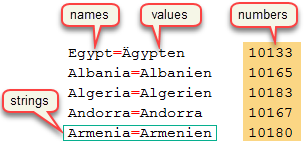
In the image, on the right, the various parts of a list are shown.
•Each element of a list contains a string and an associated integer (whose value might have been set to 0 in a previous call to List_Add, List_Insert or List_Put, if the number element of the current list was not being used).
•If the string contains an equal sign (=), then it is possible to access the text on the left as the "name" and the text on the right as the "value".
Consider the macro code below, which adds some entries to a list and then calls various list functions to get back some information.
List_Clear(sListCountries)
// put some values in the list
List_Add(sListCountries, 'Egypt=Ägypten', 10133) // item 1
List_Add(sListCountries, 'Albania=Albanien', 10165) // item 2
List_Add(sListCountries, 'Algeria=Algerien', 10183) // item 3
List_Add(sListCountries, 'Andorra=Andorra', 10167) // item 4
List_Add(sListCountries, 'Armenia=Armenien', 10180) // item 5
// now get some information back from the list
nResult = List_LocateName(sListCountries, 'Andorra') // 4
nResult = List_LocateNumber(sListCountries, 10133) // 1
nResult = List_LocateValue(sListCountries, 'Armenien') // 5
nResult = List_LocateString(sListCountries, 'Algeria=Algerien') // 3
Creation and Destruction of Lists
When using lists, don't forget to use the function List_Create to create your list at the top of the macro, and then the function List_Destroy to destroy it at the end of the macro.
See also: list macro functions.
Topic 178320, last updated on 10-Oct-2026
