Please enable JavaScript to view this site.


Navigation: Macros > Macro Language > Built-in Functions

Lists Macro Functions

Scroll Prev Up Next More
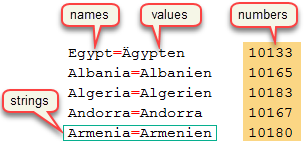
The image on the right shows the various parts of the Lists that can be used in macros.


•Each element of a list contains a string and an associated number.

•If the string of an element contains an equal sign, then it is possible to access the text on the left as the name  and the text on the right as the value.


Macro functions that relate to Lists are covered in the following topics.


•List_Add

•List_Clear

•List_Count

•List_Create

•List_Create_Global

•List_Delete

•List_Destroy

•List_GetFullText

•List_GetName

•List_GetNumber

•List_GetString

•List_GetValue

•List_Insert

•List_LoadFromFile

•List_LocateName

•List_LocateNumber

•List_LocateString

•List_LocateValue

•List_Put

•List_RemoveDuplicates

•List_SaveToFile

•List_SetFullText

•List_SetNumber

•List_SetString

•List_SetValue

•List_Sort


Alternatively, you can access the alphabetical list of all macro functions.


Topic 178485, last updated on 10-Oct-2026
