This design-time message occurs if Q++Studio notices that the Find or Change part of one of the SARAs used by your script has a large number of unchecked style options, as shown in the example below.
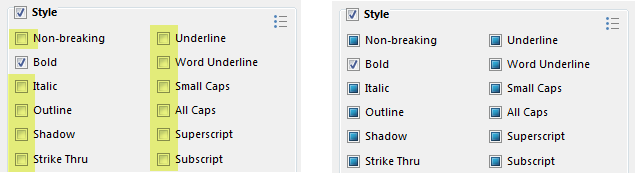
Suspiciously high number of un-checked options on the LEFT and a more likely scenario on the RIGHT where most options are set to neutral (don't care).
The settings on the left are often due to a misunderstanding of the meaning of the 3 possible states of the checkboxes attached to the various attributes settings.

Meaning of the 3 checkbox settings in the SARAs Find options

Meaning of the 3 checkbox settings in the SARAs Change options
The consequences of this message depend on whether it occurs for the FIND or the CHANGE part of the SARA.
Consequences for FIND
If the settings on the left of the image above occur in the FIND part of a SARA, they do not simply mean "search for bold text"; they mean "search for bold text that is not non-breaking and that is not italic and that is not outline ... and that is not subscript".
Clearly this is much more restrictive than simply searching for bold text.
Consequences for CHANGE
If the settings on the left of the image above occur in the CHANGE part of a SARA, they do not simply mean "add bold"; it means "add bold and remove non-breaking and remove italic and remove outline ... and remove subscript".
Clearly this is a much more systemic change to the found text than simply changing it to bold.
Solution

As a shortcut to reset all un-checked boxed to the neutral state, you can use the corresponding button at the top right of the Style groupbox, as shown in the image on the right.
Topic 181985, last updated on 17-Feb-2026