The following mini-calendar tokens modifiers are used to display Hijra and/or Islamic dates in mini-calendars:
Modifier |
Left to Right |
Right to Left |
:isl
To display Hijra/Islamic dates in a using western characters, add the :isl modifier to the end of the mini-calendar token; and use any font you wish to display the @ markers. |
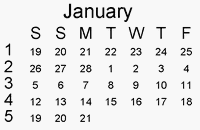 |
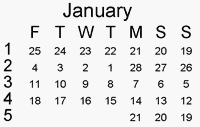 |
:araIs
To display Hijra dates in Arabic in a mini-calendar, add the :araIs modifier to the end of the mini-calendar |
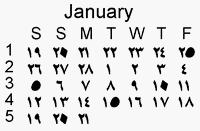 |
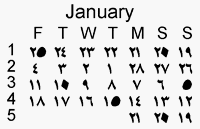 |
:araGr
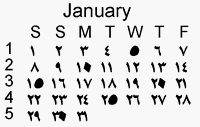
To display Gregorian dates (western) using Arabic numbers, all you need to do is make sure the font used for the @ dates markers is the font used to display Arabic characters. |
 |
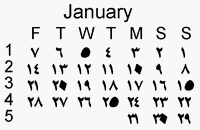 |
In all the above cases, you can also use mini-calendar options to have the mini-calendars start on the weekday of your choice and/or run from right-to-left.
See also: combining gregorian and non-gregorian dates in the same mini-calendar, arabic tokens, muslim dates tokens, right-to-left override modifier.
Topic 171950, last updated on 12-Dec-2023