Possible Cause 1
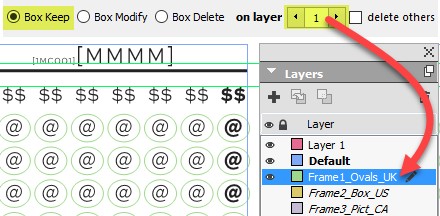
This would happen, for example, if in the example on the right, the layer Frame1_Ovals did not exist, or had been left invisible in the scanned GridTemplate.
Possible Cause 2
Another possible reason for this message to be issued is if your frame layer names are not as expected (layer names of the format FrameX_SomeName where X is the layer number set in the on layer field and SomeName is a name you can use to identify the layer, but is ignored otherwise).
•Do not use leading zeroes for your frame numbers. That is to say, use Frame1, Frame2, ..., Frame9 (and not Frame01, Frame02, ..., Frame09).
•Make sure that the frame numbers are followed by an underscore and a label of your choosing (eg. Frame1_spain rather than Frame1spain or simply Frame1).
If you encounter this error, and the above possible causes are not the reason, please send us the script via technical support, being sure to mention the error message ID 182200.
Topic 182200, last updated on 17-Jan-2026