

This line ending therefore behaves like Hard Return, without applying additional paragraph formatting. Any enabled text override still applies.
The special case itself is still active. When it matches, it prevents later cases from being evaluated. If a simple hard return is the intended result, select Hard Return and leave the case enabled, preserving its conditions and any intended text override.
Solution 1
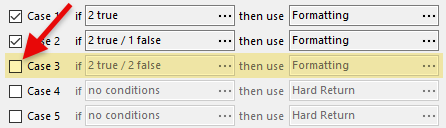
Check that this is the intended result: the default may produce different output. Being the last enabled case does not, by itself, make the case redundant.
Solution 2
If this case must remain active to prevent later cases from applying, copy the line-ending settings from the default case to this case within the same GenTokens configuration. Include the default text-override settings, and keep the target case enabled with its conditions and priority unchanged.
Matching dates will then use the default appearance while this case continues to block later cases. The default may include formatting of its own; it is not necessarily a simple hard return.
These settings are copied, not linked. If you change the default later, update this case as well if it should continue to use the same settings.
Topic 190150, last updated on 28-Oct-2026
