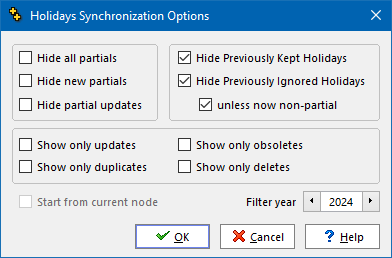
➢To access Holidays Synchronization, from the main menu follow the menu sequence Data > Holidays Synchronization.
This topic presents a detailed and encyclopedic coverage of the meaning of the options of the Holidays Synchronization Options dialog.
However, we strongly recommend that you follow the steps detailed in the suggested procedure topic, until you have performed at least one holidays synchronization and feel that you understand these options well.
List of Start-up Options
Hide All Partials |
Hides all suggestions related to a partial holiday (regional, banks only, government only, ..., that is to say any recurring holiday with a non-blank observance). |
||
Hide New Partials |
Hides all suggestions related to a partial holiday (regional, banks only, government only, ..., that is to say any recurring holiday with a non-blank observance) that is new (ie. in the source set, but not in the target set) to be skipped. |
||
Hide partial updates |
Hides differences where the only difference between your holiday, and the holiday it is linked with, lies with the Observance(s) column which indicates if a holiday is nationwide or partial. If the diaries you generate do not differentiate between nationwide and partial holidays, then you may wish to leave this option checked. |
||
Show only updates |
Lists only the differences of holidays which exist in both your database and the Q++Studio Worldwide Public holidays database, but whose rule has changed. This option is usually used in the 1st stage of holidays synchronization. |
||
Show only obsoletes |
Lists only the holidays which once existed in both your database and the Q++Studio Worldwide Public holidays database, but which have now been removed from the Q++Studio Worldwide Public holidays database, due to being obsolete (this usually occurs for holidays that were one-off in past years, or which have ceased to be observed). This option is usually used in the 2nd stage of holidays synchronization. |
||
Show only duplicates |
Lists only the holidays of your database which are linked to a holiday of the Q++Studio Worldwide Public holidays database, which already has a link from your database. This is usually the symptom of holidays having been copied and then modified to a form totally unrelated to the original holiday, and the correction of this problem is discussed in the 3rd stage of holidays synchronization. |
||
Show only deletes |
Use this option, as described in step 7 of the recommended synchronization procedure, to handle any holiday that is identified as spurious. |
||
Hide Previously Kept Holidays |
(default value is true and should usually be kept so) Hides all the spurious holidays (holidays that are in your set but not in the Q++Studio set) that you have asked Q++Studio to keep and not ask you about anymore in previous holidays synchronizations. By default, when this option is checked, Q++Studio does what it was told to do (keeps these spurious holidays and does not ask you anymore). This option should only be unchecked if you have erroneously told Q++Studio to keep a spurious holiday, and want to be able to correct this error. |
||
Hide Previously Ignored Holidays |
(default value is true and should usually be kept so) Hides all the holidays differences that you have asked Q++Studio to ignore and not ask you about anymore in previous holidays synchronizations. By default, when this option is checked, Q++Studio does what it was told to do (does not ask you anymore). This option should only be unchecked if you have erroneously told Q++Studio to ignore a holiday difference, and want to be able to correct this error.
|
||
Start from currently selected TreeNode |
If you have already synchronized some sets, and want to start where you left off, then check this option. Note that, to use this option, you should have preselected the first pair of sets to be compared (the Q++Studio set on the left and your set on the right) before clicking on the SYNC ALL button. |
||
Synchronization prepares your holidays database for publication from the Filter Year onward. 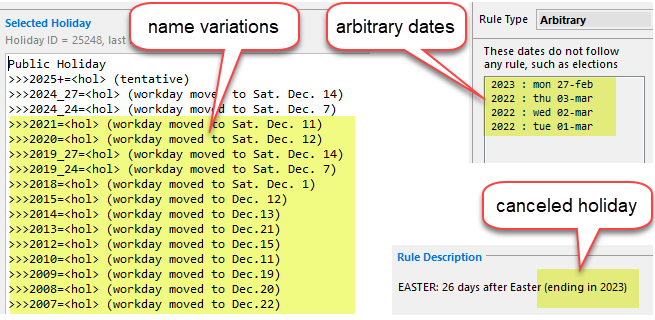 elements that would be purged from a linked holiday synchronized for the year 2024 Historical data that has no relevance to the years beginning with Filter Year will be purged as follows:
•Updated Holidays: any holiday which is updated to reflect the current recurrence rule of the holiday from the worldwide public holidays database to which it is linked will be stripped of elements of name variations, arbitrary dates, exceptions, and validity, that are relevant exclusively to years before the Filter Year. •Obsolete Holidays: holidays linked to a holiday which stopped being observed before the year Filter Year will be labeled as obsolete, with deletion as the default suggested action. For example, if a holiday was last observed in 2023, then synchronization with a Filter Year of 2024 lists all holidays linked to it as obsolete. Accepting that solution removes those holidays entirely, including their historical information. If you ask Alter Ego Services to perform the holidays synchronization for you, then this default solution is systematically applied to all obsolete holidays.
The screenshot above illustrates the historical elements affected when the Filter Year is 2024. |
After you click OK, the process of holidays synchronization begins.
Topic 181135, last updated on 24-Oct-2026
