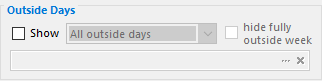
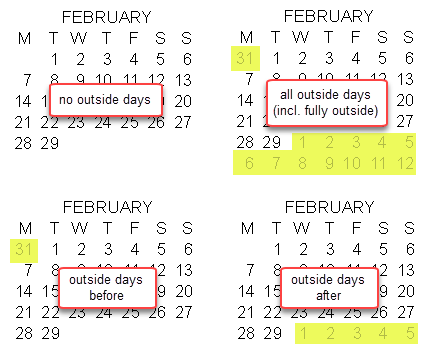
•If you select show outside days, you have the option of showing all outside days, or showing only outside days of the previous month or the following month (samples on the right).
•The settings Cur. week before and Cur. week after are similar to previous month and following month, above, but only display outside days of either the previous or following month if these dates belong to the current week.
•The setting Current week shows outside days from before or after the month, as long as the dates correspond to the current week. These three settings require a daily or weekly GridTemplate, for which a current week is defined. When Current week before or Current week after is selected, Hide fully outside weeks is automatically selected and cannot be cleared. This rule does not extend to Current week, whose selection of outside dates depends on how the current week is defined in the Current Week options.
•The settings Month Change, Month Change Before, and Month Change After display an outside date of the mini-calendar if a change of month occurs in the current spread and the date is also in the current spread.
•The settings Month Change (all week), Month Change Before (all week), and Month Change After (all week) display an outside date of the mini-calendar if a change of month occurs in the current spread and the date is in the same week as any of the dates of the current spread.
Hide fully outside weeks hides the @ date markers of a week whose dates all fall outside the mini-calendar’s month, even when the selected Outside Days setting would otherwise show them.
This option only controls the appearance of the individual dates (the @ markers). To determine if the week number of a fully outside week should appear or not, and how, use the week number headers options.
See also: Current Week mini-calendar Options, Current Day mini-calendar Options, Grid Options Monthly Outside Days, Outside Days Override mini-calendar Modifier.
Topic 107097, last updated on 01-Aug-2020
