Since 2022, the recommended method of displaying fractional 23/30 and 24/31 minicalendar dates is to use native formatting.
One of the options available to handle months that span 6 weeks within a 5-week minicalendar is to use the Qpp2 glyph font that comes with Q++Studio.
➢This option only covers the 23/30 and 24/31 combined dates, not the 1/8 and 2/9 case, which requires the use of native formatting.
The Qpp2 font contains the combo numbers 23/30 and 24/31 in 3 different styles:
•Times
•Arial
•Courier
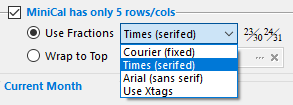
While these 3 choices are somewhat limited, remember that the font size used for most MiniCalendars dates is around 4 points.
Therefore the equivalent font size that would be used by each date in a 23/30 or 24/31 combo date would be 2 or 3 points, a size for which the difference between, for example, Times New Roman and Garamond, is hardly noticeable.
In the Qpp2 font, the top number (23 or 24) is independent from the bottom number (30 or 31). This makes it possible to display different attributes (for example color on holidays) for the top and bottom numbers. If you cannot find the QPP2 font on your system, you can install it from the \Setup\Fonts\ sub-folder of your server folder.
See also: five week minicalendars.
Topic 185120, last updated on 19-Mar-2026