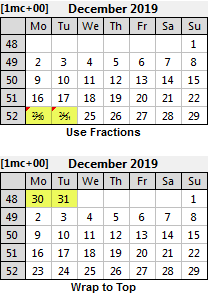
There available solutions are:
•Use Fractions:
oNative formatting: display combined 23/30 and 24/31 dates at the bottom, as well as 1/8 and 2/9 at the top of the months, using all the formatting options available in the text formatting editor as well as character-based tracking and the possibility of skewing the / separator. (the recommended option)
oSimple: using the Qpp2 special glyph font, days 30 and 31 are combined with the days 23 and 24 in the form of a fraction, such as 23/30 and 24/31. (only available for 23/30 and 23/31 fractions)
oXpress Tags: use XPress Tags to display text formatted specifically for the combined 23/30 and 24/31 dates. (only available for QuarkXPress and for 23/30 and 23/31 fractions)
•Wrap to Top: days 30 and 31 are moved to the top-left of the MiniCalendar.
•Display 1 and 2 on Top: days 1 and 2 are moved above the first row.
These various options, and their advantages and disadvantages, in the following topics.
See also: one-line minicalendars.
Topic 143700, last updated on 17-Apr-2026