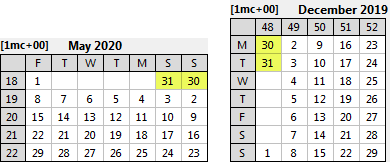
Examples of the Wrap to Top option for Vertical and Right-to-left MiniCalendars
One option to handle months that span 6 weeks within a 5-week mini-calendar is to use the Wrap to Top option.
Using the Wrap to Top option, if the 30th and/or 31st of the month fall on a 6th week, they are brought back to the first row of the mini-calendar.
Note that the to Top in this option name is a bit of a misnomer, since it will also work for vertical and right-to-left mini-calendars.

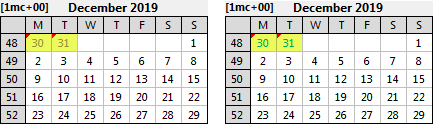
To distinguish these occurrences of 30 and/or 31 from other dates on the first row of the mini-calendar, you can choose to apply different font attributes to these dates using the ButtonEdit to the right of this option.
The examples show the effect of displaying these dates in a lighter shade, or different color.
See also: five week mini-calendars.
Topic 188925, last updated on 19-Mar-2026
